Architecture views
An architectural view specifically shows the information that answers a particular question. Different views can explain the same system without contradiction from different perspectives.
- Key issueEach view answers a named question.
- Target groupWho needs the answer.
- SelectionOnly the right thing comes into view.
Context
Why this is important
A single presentation cannot answer every question. Whoever puts everything in a picture, gets a picture that does not help anyone. The structure of an entire architectural description deals with a separate building block.
This building block explains the selection and purpose of views. For the structure of an entire architectural description, see arc42.
Four views on the same shop
At the shop, the department, development, error analysis and operation need different images. All four show the same architecture, but each answers a different question and leaves out different ones.
This is how you read the picture
- Key issue The riders, such as “How does a payment work?”
- Target group Above every question: product & department, development, error analysis, operation.
- Selection At every point of view: “Show” and “Leave away”.
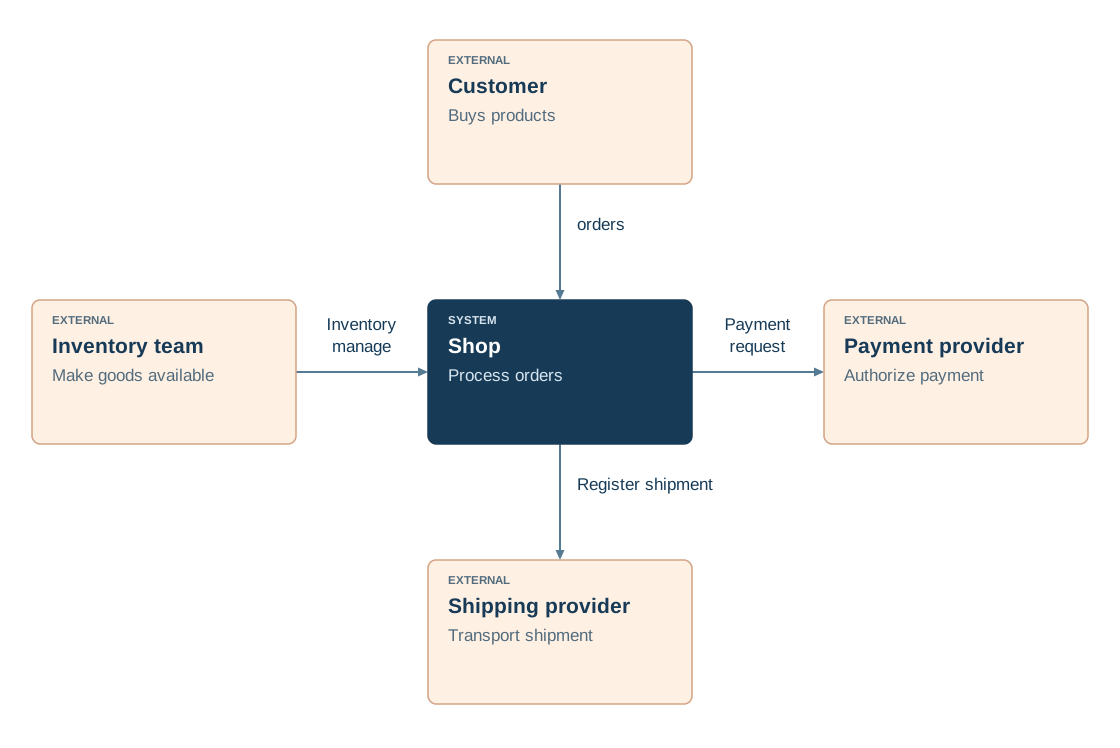
System context
- Shows
- The shop as a unit and all partners outside.
- Leaves away
- Modules, flows and servers.
- Payment provider
- A neighbouring system outside the border.
Building block view
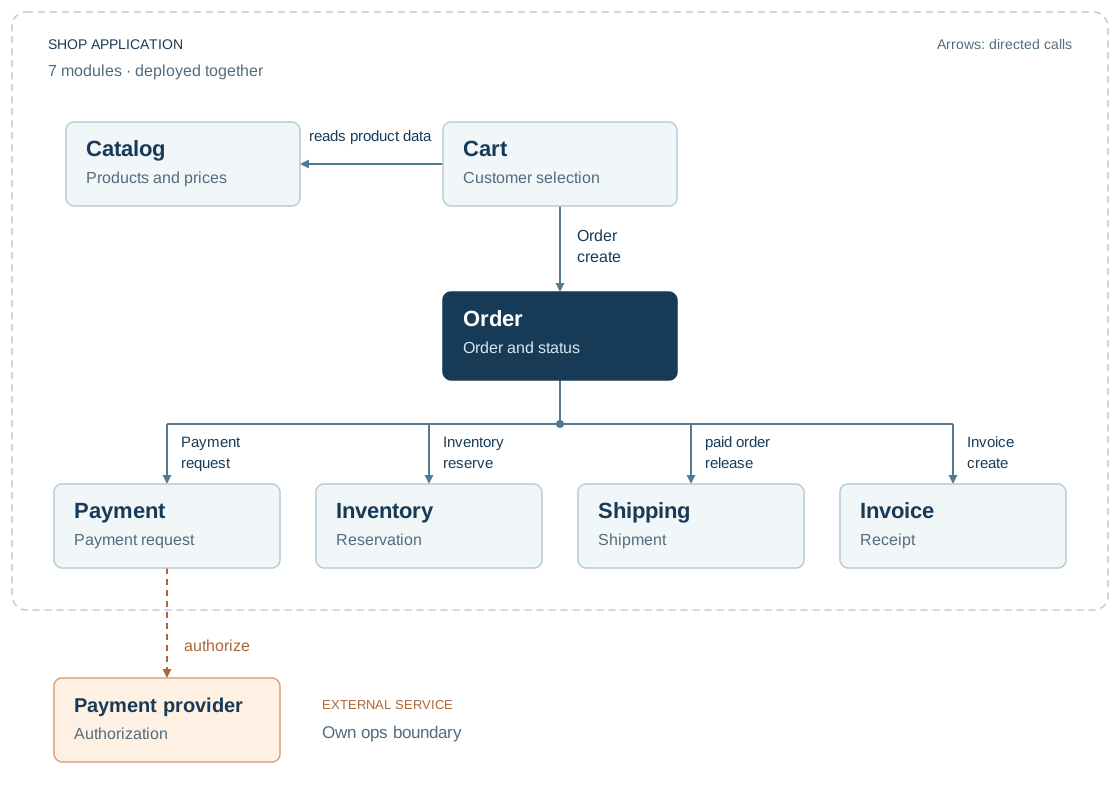
- Shows
- Seven modules and who calls whom.
- Leaves away
- Order in time and server.
- Payment provider
- The goal of a single arrow, from the payment module.
Maturity view
- Shows
- Messages in chronological order.
- Leaves away
- Modules that are not involved and servers.
- Payment provider
- A participant with their own timeline.
- Order → Payment0 ms: Payment order B-1042 handed over
- Payment → Providers20 ms: Authorization P-731 Request
- Providers250 ms: Save authorization
- Providers → Payment280 ms: Authorization confirmed
- Payment → Order300 ms: Report payment status
- Order320 ms: confirm order
Deployment view
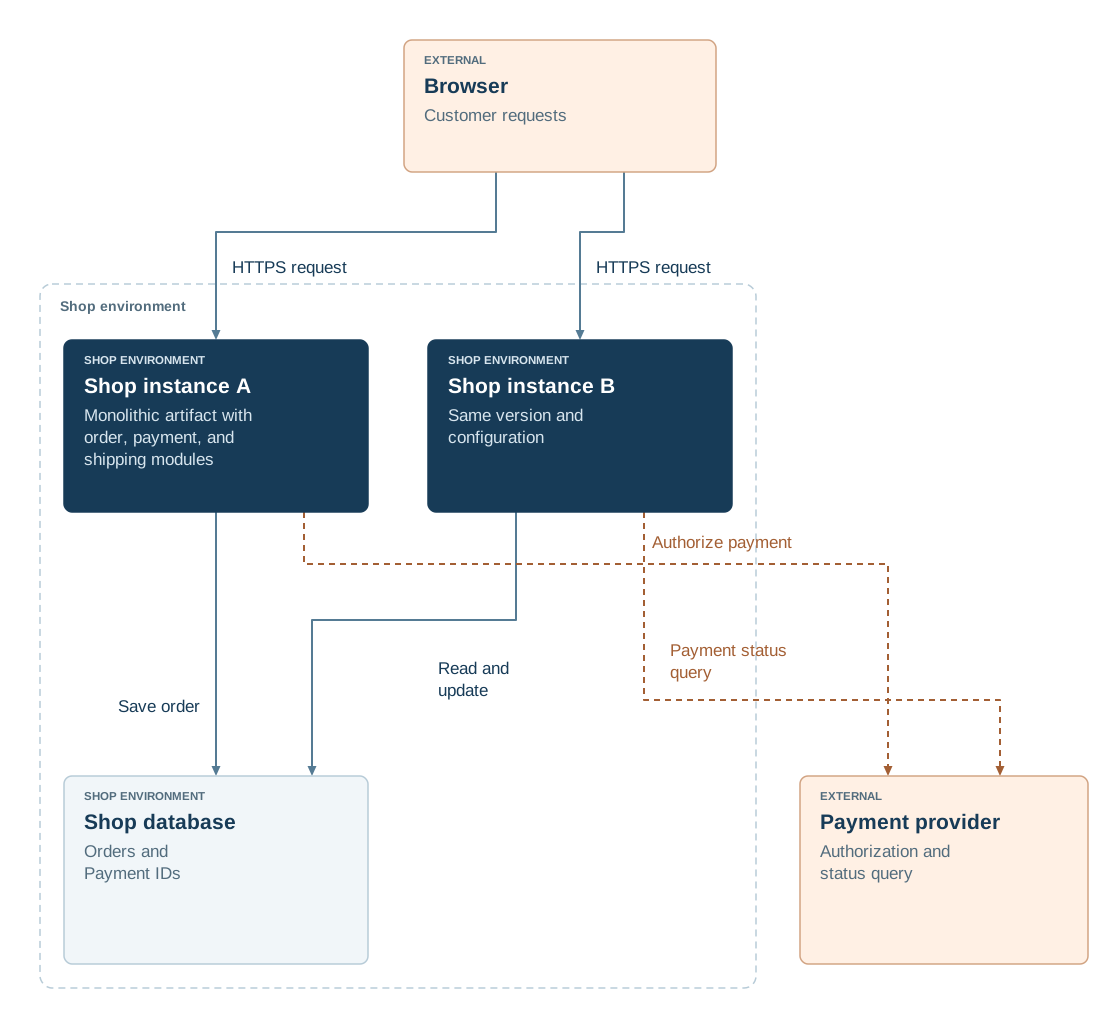
- Shows
- instances, database and external services.
- Leaves away
- The internal module breakdown.
- Payment provider
- An external service outside the shop environment.
Benefits & limitations
Helps if:
- Development, business stakeholders and operations need different views of the same system.
- A runtime view complements the structural perspective if a specific disruption or change in the temporal flow is to be traceable.
Boundaries
- Each view deliberately omits something; only several views together answer all questions, such as C4 for the structure.
- Views diverge when names and relationships are not maintained together; “payment” must mean the same everywhere.
- A structural perspective does not show sequences over time, such as the path of a payment; a Sequence Diagram serves that purpose.
In practice
- Define the question and audience. State what insight the representation should provide and what prior knowledge it assumes. This determines the level of detail and the visible elements.
- Choose an appropriate abstraction. Decide whether to focus on structure, runtime interaction or deployment. Where useful, connect the representation to the C4 Model or a Sequence Diagram, keeping each view focused on its question.
- Align names and references. Check that recurring elements have consistent names across views. A Deployment View can connect the same building blocks to their runtime locations.
Read the detailed explanation
Each view selects only the information needed to answer its question. A structural perspective assigns responsibilities, an interaction perspective shows how parts work together over time, and a deployment perspective connects software to its runtime locations. The C4 Model offers structural perspectives at different levels of detail; Sequence Diagrams show interactions over time.
Views describe the same architecture and remain connected through shared names and references. Each view therefore needs a clear purpose, an audience and a reasoned selection of elements. arc42 can organise additional sections of a complete architecture description.
Philippe Kruchten's 4+1 view model organises the logical, process, development and physical views and connects them through scenarios.
Check your understanding
Test yourself in three stages
ReadingCheck in the picture
In which view is the payment provider a participant with its own timeline?
View the solution with justification
In terms of maturity. It shows messages in chronological order and is aimed at error analysis.
ApplyingTransferred to a new situation
A new colleague asks which module is responsible for billing. What point of view do you show him?
View the solution with justification
The building block view, because it shows the seven modules with tasks and dependencies. The system context only shows external relations.
EvaluateWeighing an alternative
The team wants to maintain a single view for all target groups. What speaks in favour, what speaks against?
View the solution with justification
There is less care for this. On the other hand, the view would have to mix timelines, modules and operations and would become unreadable. Multiple views of the same architecture remain clearer.
Explore further
These building blocks continue the thoughts of this page.
References
- C4 · Diagrams (opens in new tab)Assigns context, container and component views to different levels of detail.
- arc42 · Modular view (opens in new tab)Describe responsibilities and interfaces hierarchically.
- arc42 · Timeline view (opens in new tab)Explain cooperation of building blocks on concrete processes.