C4 model
The C4 model describes software in several levels: system context, containers, components and code. Each level answers a different question and can remain readable independently.
- System contextWho uses it, who is a neighbor?
- ContainersExecutable or storage units.
- ComponentResponsibilities within a unit.
Context
Why this is important
A diagram that mixes system boundary, modules, and classes does not answer a question correctly. C4 separates the layers so that each reader’s question gets a suitable picture. The distribution on infrastructure shows its own view.
This building block deals with levels of abstraction and their purpose. System context deepens actors and boundary; distribution view assigns runtime and infrastructure.
At a glance · Four zoom levels of architecture
Same shop, three C4 levels
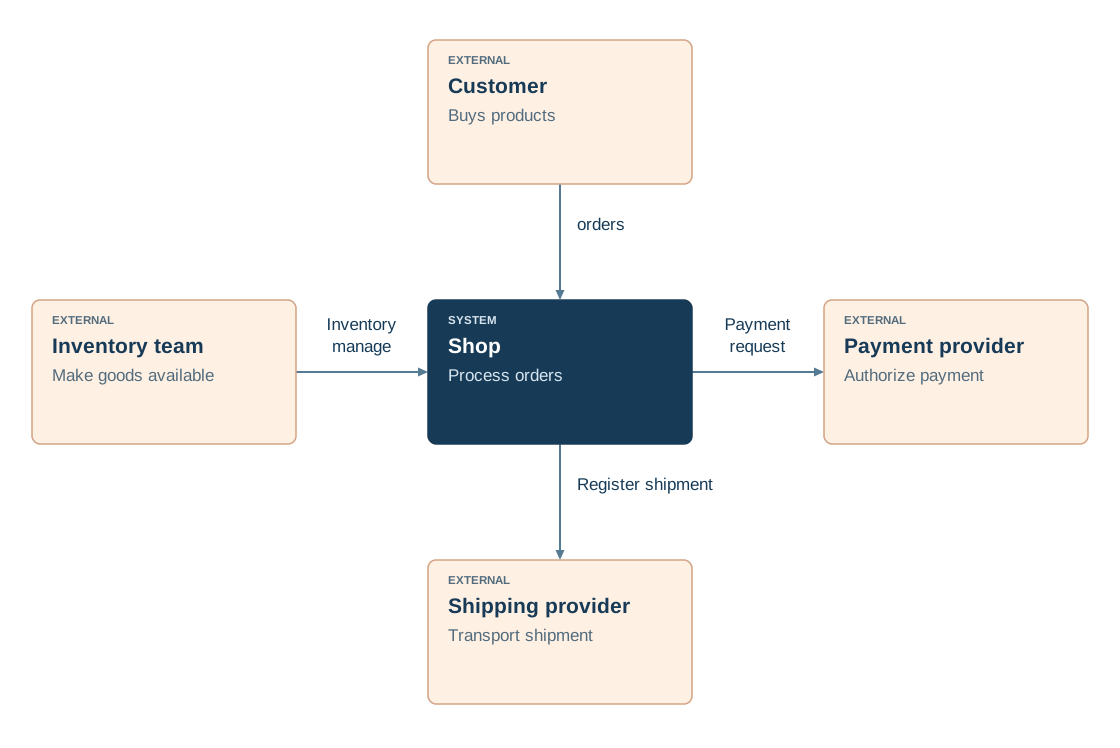
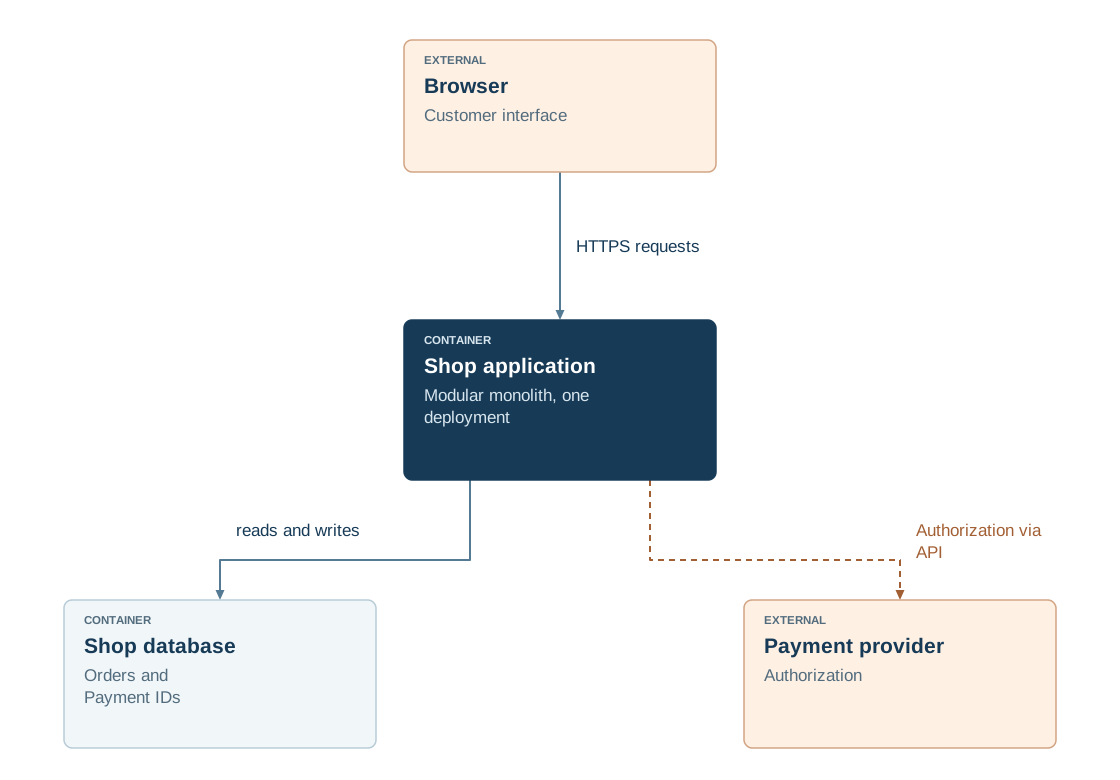
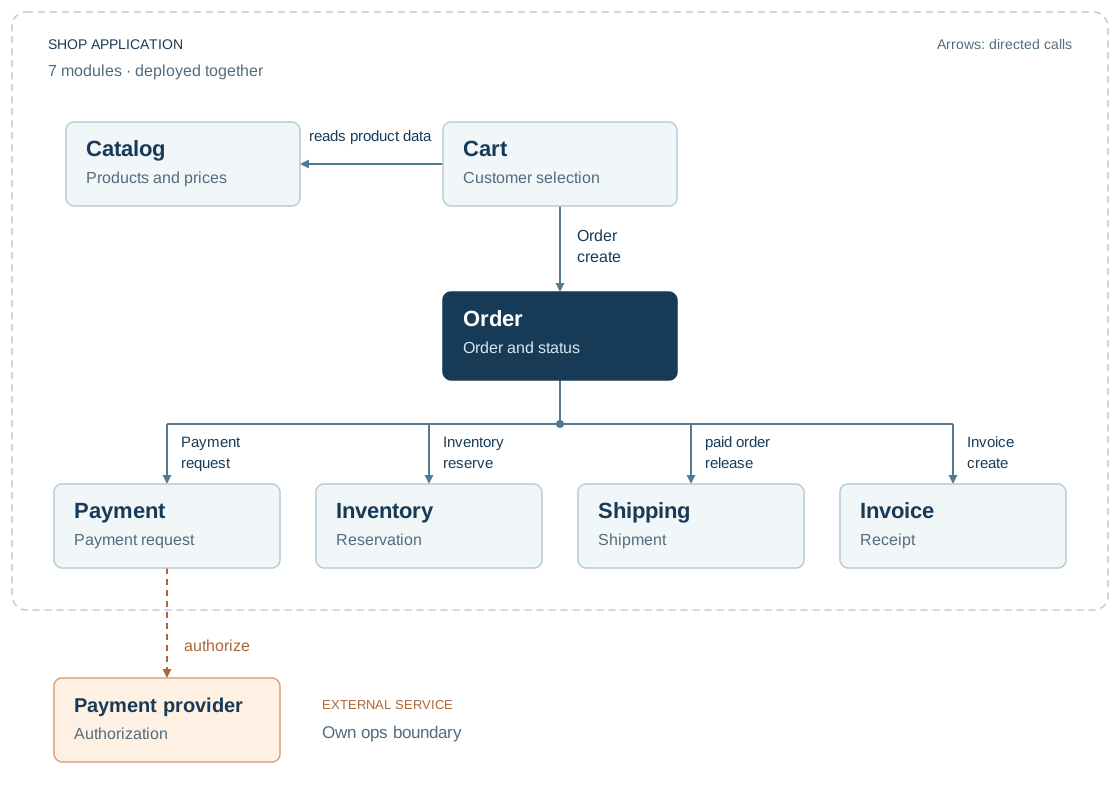
The shop is a system with browsers, an external payment provider and a shop application. A container view shows the shop application and database; only the component level breaks the application into modules.
This is how you read the picture
- System context Riders 1: the shop as a box between customer and partners.
- Containers Riders 2: Shop application and shop database.
- Component Riders 3: the seven modules in the shop application.
System context
- Shows
- The shop as a box with customers and neighboring systems.
- Leaves away
- Everything that is in the shop.
- Payment provider
- Neighboring system outside the border.
Containers
- Shows
- Shop application and database with their connections.
- Leaves away
- Modules in Application and Classes.
- Payment provider
- External system called by the application via API.
Component
- Shows
- The seven modules and who calls whom.
- Leaves away
- Database and classes in the module.
- Payment provider
- Target of a single arrow from the payment module.
Benefits & limitations
Helps if:
- Audiences benefit from consistent levels between system overview and internal structure.
- Multiple systems can be described using shared terminology and abstraction.
Boundaries
- C4 shows structure; Sequence diagrams show message order and failure paths.
- The code level becomes outdated quickly; draw it only for selected important areas.
- The Deployment view shows where the software runs, complementing C4’s structural views.
In practice
- Choose the audience and abstraction. Decide which question the diagram should answer and which level is sufficient. State the system boundary and version represented. This creates a view with a clear purpose.
- Model elements and relationships. Use appropriate C4 terms and label responsibilities and communication relationships. Check that elements at the same level are comparable. This keeps the view understandable and structurally consistent.
- Reconcile views and add detail selectively. Check context, container and component views for conflicting names and boundaries. Add finer levels only for remaining information needs. This produces a coherent architecture overview without unnecessary detail.
Read the detailed explanation
The C4 model describes static structure at four levels: system context, containers, components and code. In C4, a container is an executable application or data store, defining an architectural level. Each level answers a different question and can serve as an appropriate Architecture view within shared arc42 documentation.
Add detail only as far as a concrete question requires. Name relationships and responsibilities clearly at each level. Dynamic views explain message sequences; deployment views map software to specific runtime environments. Both complement C4’s static structural levels. A diagram must make its scope and audience clear so that different levels are not mixed into an overloaded view. Context and container views often provide the starting point; component and code levels explore selected questions. Dynamics and deployment remain complementary views for other questions.
Simon Brown developed the C4 model; its levels are Context, Container, Component and Code.
Check your understanding
Test yourself in three stages
ReadingCheck in the picture
Which running units does the container level show?
View the solution with justification
The shop application and the shop database. Browsers and payment providers are on the outside; the modules only show the component level.
ApplyingTransferred to a new situation
A partner wants to know which external systems the shop uses. What level do you show him?
View the solution with justification
The system context. There are customers, shops and payment providers, without modules or code.
EvaluateWeighing an alternative
The team wants to put all modules, classes and neighbouring systems into a single diagram. What is the advantage, what is the disadvantage?
View the solution with justification
A diagram gives everything at a glance. However, it does not answer a single reader’s question clearly and quickly becomes unreadable; separate levels always remain comprehensible by themselves.
Explore further
These building blocks continue the thoughts of this page.
References
- C4 - System context diagram (opens in new tab)Defines system boundary, user and neighboring systems in a contextual view.
- C4 – Container diagram (opens in new tab)Describes applications and data storage within the system boundary.
- C4 – Component diagram (opens in new tab)Explains the structure and responsibilities within a container.