Authentication & authorisation
Authentication determines which identity a request makes. Authorization then checks whether this identity is allowed to use the desired resource or action.
- AuthenticationWho asks the question?
- AuthorisationCan this identity do that?
- RejectionThere are two ways to say no.
Context
Why this is important
Who only checks whether someone is registered, possibly gives out foreign data. Only the separate question of whether this identity may use the resource protects orders. Roles and border crossings have their own building blocks.
This building block separates identity and access decision. Least Privilege shapes roles; Trust Boundaries mark necessary exams at transition.
At a glance · Registration and token verification
Access to an order page
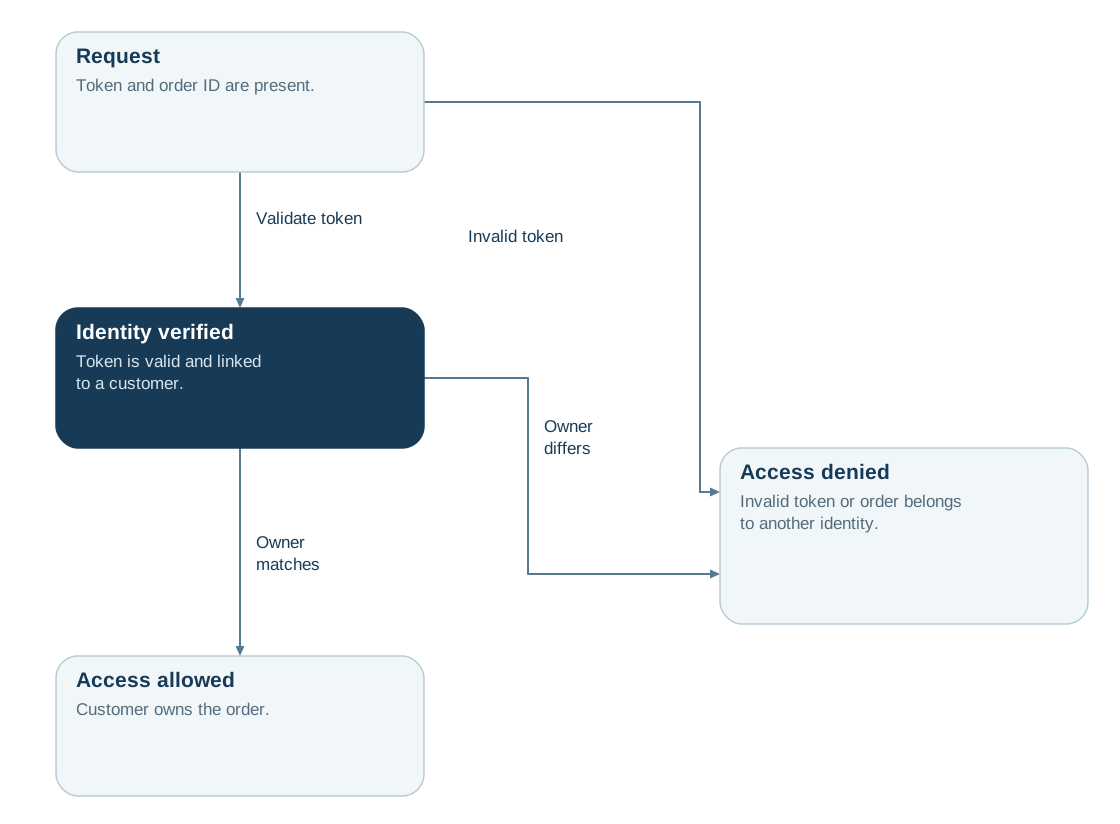
A registered customer opens an order page. The shop checks the session token and then compares the customer identity with the order owner.
This is how you read the picture
- Authentication State “Identity verified”: Token is valid and assigned to a customer.
- Authorisation Transition “Owner agrees” leads to “Access allowed”.
- Rejection Two arrows to “Access refused”: “Token invalid” and “Owner deviates”.
Wide diagram · Move laterally if necessary
Read diagram as text
- Request: Token and order identifier are available.
- Identity checked: Token is valid and assigned to a customer.
- Access allowed: The customer is the owner of the order.
- Rejected access: Token invalid or order belongs to another identity.
- Request → Identity checked: Validate tokens
- Identity checked → Access allowed: Owner agrees
- Request → Rejected access: Tokens are invalid
- Identity checked → Rejected access: The owner deviates
Benefits & limitations
Helps if:
- Different users, services and roles need differentiated access decisions for functions and data.
- Organisation, ownership, state and delegation shape object-level authorisation for each request.
Boundaries
- A valid token establishes identity; authorisation determines whether the customer may view this order.
- Hidden buttons provide no protection; the server checks ownership and the action on every access.
- Even correct checks do not limit the damage from a stolen token; Least Privilege and Secrets address that.
In practice
- Define identity verification and sessions. Specify how identity is established, renewed and revoked. Clarify the validity and context of presented credentials. This provides a reliable basis for subsequent authorisation decisions.
- Express authorisation rules. Define subject, action, resource and context as separate criteria. Specify the required role, ownership or state conditions. This makes decisions explainable and testable.
- Test the checked access paths. Exercise allowed and denied requests through selected UI, API and background paths, including role changes and revocation. Record denials and misconfigurations. This demonstrates how the tested paths enforce identity and permissions.
Read the detailed explanation
Authentication checks who is making a request and binds it to an identity. Authorisation then evaluates the subject, action, resource and context. Roles can express capabilities; ownership, tenant association and object state often contribute to the decision. These checks build on Trust Boundaries and are constrained by Least Privilege.
Successful sign-in does not grant automatic access to arbitrary object identifiers. Every relevant read or change operation needs a server-side decision. Interfaces can present functions clearly but do not protect against direct requests. Revocation, role changes and delegation affect the context and must be accounted for in access paths. The decision can combine role-based capabilities with resource relationships and object state. This keeps a general role distinct from permission for a specific operation.
OAuth 2.0 governs delegated authorisation; OpenID Connect adds an authentication layer on top.
Check your understanding
Test yourself in three stages
ReadingCheck in the picture
Which two transitions end in the “Rejected Access” state?
View the solution with justification
“Token invalid” from “Request” and “Owner deviates” from “Identity verified”.
ApplyingTransferred to a new situation
A customer calls with valid token his own order B-1042 up. What are the conditions of the request?
View the solution with justification
Request, identity checked, access allowed. The token is valid and the customer is the owner of B-1042.
EvaluateWeighing an alternative
The team just wants to check the token and save the owner verification. What speaks against it?
View the solution with justification
This is easier, but any registered customer could call third-party order identifiers. The valid token only proves the identity, not the right to the order.
Explore further
These building blocks continue the thoughts of this page.
References
- OWASP – Authentication Cheat Sheet (opens in new tab)Explains secure identity verification and the protection of registration procedures.
- OWASP – Authorization Cheat Sheet (opens in new tab)Describes access decisions and their consistent enforcement.
- OpenID Connect Core 1.0 (opens in new tab)Normative basis for federated authentication based on OAuth 2.0.