Asynchronous communication
Asynchronous communication decouples the acceptance of a task from its subsequent processing. A business status makes the intermediate status observable.
- AcceptanceOrder is stored, not done.
- StatusMake the intermediate state visible.
- RetryTrying mistakes again.
Context
Why this is important
If the checkout waits for each subsequent task, it depends on its duration and errors. Asynchronous processing decouples this, but needs visible states so that no one has to guess. The distribution to several recipients is a separate building block.
This building block explains temporally decoupled processing. For distribution to multiple recipients, see Queues, Pub/Sub & Streams.
At a glance · Message about a queue
Conditions of an invoice order
After confirmed order, invoice accepts an order and creates the receipt later. The checkout does not have to wait for the finished PDF.
This is how you read the picture
- Acceptance The status accepted: Order with order ID stored.
- Status The four states adopted, under preparation, created and clarified necessary.
- Retry The transition “repeat purposefully” from clarification needed back to being worked on.
Wide diagram · Move laterally if necessary
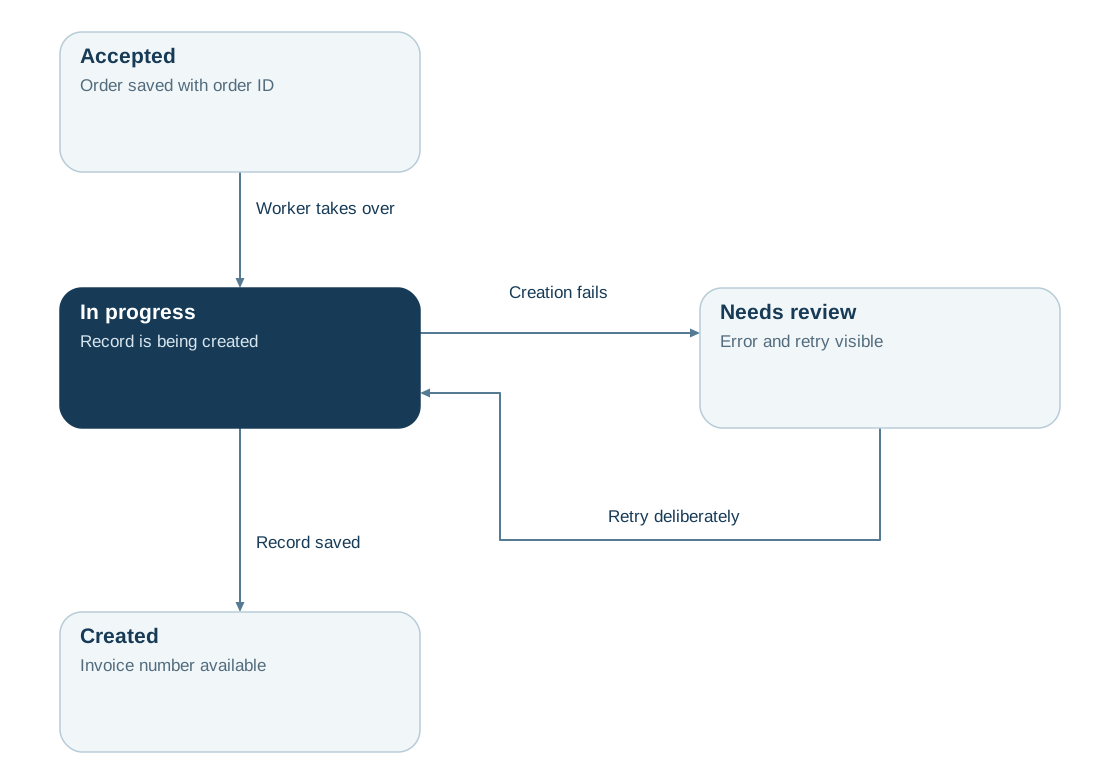
Read diagram as text
- Accepted: Order stored with order ID
- In processing: Evidence shall be produced:
- Created: Invoice number
- Clarification needed: Error and re-attempt visible
- Accepted → In processing: Worker takes over
- In processing → Created: Proof stored
- In processing → Clarification needed: Creation fails
- Clarification needed → In processing: Repeat targeted
Benefits & limitations
Helps if:
- Work that takes longer than an open request can complete asynchronously after acceptance.
- A message buffers load peaks until processing capacity is freed up.
- Independent recipients work with messages decoupled from the producer's runtime and publication cycle.
Boundaries
- Acceptance of an order does not mean business completion; the result needs its own status and a way back.
- Persistently slow consumers cause queues to grow; without backlog alerts and limits, this may be noticed too late.
- Repetition creates duplicates and can change order; see Idempotency and Transactional Outbox.
In practice
- Define states for acceptance, processing, completion and errors. The caller must know which feedback applies immediately and how a later result will be achievable.
- Protect both the message and its business effect against crashes and retries. Define when the recipient acknowledges processing and how persistently failing work is isolated.
- Monitor backlog, message age and resumption for each recipient. Queues, Pub/Sub & Streams explains distribution; Transactional Outbox covers durable intent to send.
- Assess outages and remaining coupling. Imagine pausing the invoice worker and describe acceptance, backlog and resumption. Also examine schema, net versus gross amounts and ordering so delayed processing preserves the intended business effect.
Read the detailed explanation
Asynchronous communication separates acceptance from later processing. A message or task is stored durably, allowing the original caller to continue while a recipient does the work.
Acceptance, business completion and notification are separate states. Queues buffer load but also create backlogs, delays and retries. Progress, failure paths and resumption must therefore be observable and understandable to the caller.
Pub/Sub and Streams defines recipients and replay capabilities; Transactional Outbox protects the transition from local commit to publication.
Order acceptance can continue while the invoice worker is paused, provided tasks are stored durably and the backlog remains manageable. Schema, business meaning and required ordering remain shared assumptions. Coupling helps assess these dimensions separately from processing time.
Check your understanding
Test yourself in three stages
ReadingCheck in the picture
What status does customer service see immediately after acceptance of the order?
View the solution with justification
Adopted. The receipt is commissioned, but not yet confirmed as created.
ApplyingTransferred to a new situation
Evidence production fails. What state does customer service show, and what next?
View the solution with justification
Clarification needed, with visible error. Then it can be repeated in a targeted manner, and the order goes back into processing.
EvaluateWeighing an alternative
Should the checkout wait for the finished PDF? How do you weigh up?
View the solution with justification
Then the customer immediately sees the result, but the checkout depends on the receipt creation. Asynchronously, the checkout ends earlier; for this, states and repetition must be consciously designed.
Explore further
These optional deepenings complement the learning goal of this page.
Claim Check
With Claim Check, a large payload, such as a product file, is stored separately in object storage; the message contains a reference and the necessary metadata. This keeps queue messages small. The contract must define access protection, validity and deletion. The file must remain available throughout possible delays and retries; expired references and orphaned files need an explicit clean-up process.
For testingSafeguard Claim Check. For a large product file, define the reference format, permissions, retention period and deletion time. Verify that the file remains accessible through backlogs and retries, and that expired references and orphaned files are detected and cleaned up.
Further building blocks
References
- Microsoft · Communication in Microservice Architecture (opens in new tab)Compares synchronous calls and asynchronous message transmission.
- Microsoft publisher subscriber (opens in new tab)Declares decoupled event distribution and delivery conditions.
- RabbitMQ · Queues (opens in new tab)Explains queue characteristics, consumers and news life cycle.
- Gregor Hohpe, The Many Facets of Coupling (opens in new tab)Differentiates several dimensions of coupling, including time and semantic dependencies.
- Microsoft Claim Check (opens in new tab)Store large payloads separately; coordinate reference, access and service life.